Choose a report below to see what you can check from the iPhone app.
See sales and revenue for today, this month, last month, and this year across all your stores. You can also check subscription revenue and when each report was last updated.
See one store or all stores
Compare the last 7, 30, or 90 days
Track monthly recurring revenue and active subscriptions
Open any completed sale to see the total, discounts, tax, refunds, products, customer, and subscription renewal details in one place.
What the customer paid and what was refunded
Products included in the sale
Customer and transaction details
Search for a sale by its ID, then filter by status, date, amount, or store.
Search by sale ID
Filter by status, date, or amount
Always see which store you are viewing
See which products are selling, review a customer’s purchase history, and open the related sales without starting a new search.
Top-selling products
Customer purchase history
Store name stays visible
Check sales and revenueReal app screen · sample data
Get sale alerts and check every EDD store in one app.
See a completed sale as it happens, view combined totals across stores, and open related products, customers, and sales without returning to WordPress.
Get a notification when a sale completes
Turn notifications on for each store. Alerts show the store name and sale amount, even when the app is closed. They never include customer names or payment details.
$
DownloadSignal · nowNew sale · $149.00Northstar Downloads
See all your EDD stores in one app
View combined sales and revenue across your stores, or choose one store to see its reports on their own.
See product and customer history
Open a product to see its sales, or open a customer to see their purchase history—without running the same search again.
Reports, store history, and reconnecting
Use these tools to check your stores each day and reconnect if something changes.
Reports
Sales and revenue for today, this month, last month, and this year
Sales and revenue charts
Monthly recurring revenue and active subscriptions
Sales details
Product and customer history
Renewals, refunds, tax, and discounts
Search and filters
Alerts and updates
Completed-sale notifications
Last updated times and clear offline messages
Recent reports remain available when your connection is slow
Security and reconnecting
Store access saved securely on your Apple device
Non-sensitive settings backed up with iCloud
Step-by-step help to reconnect a store or device
These screens accurately show the current DownloadSignal app with sample store data. Some details may change before release.
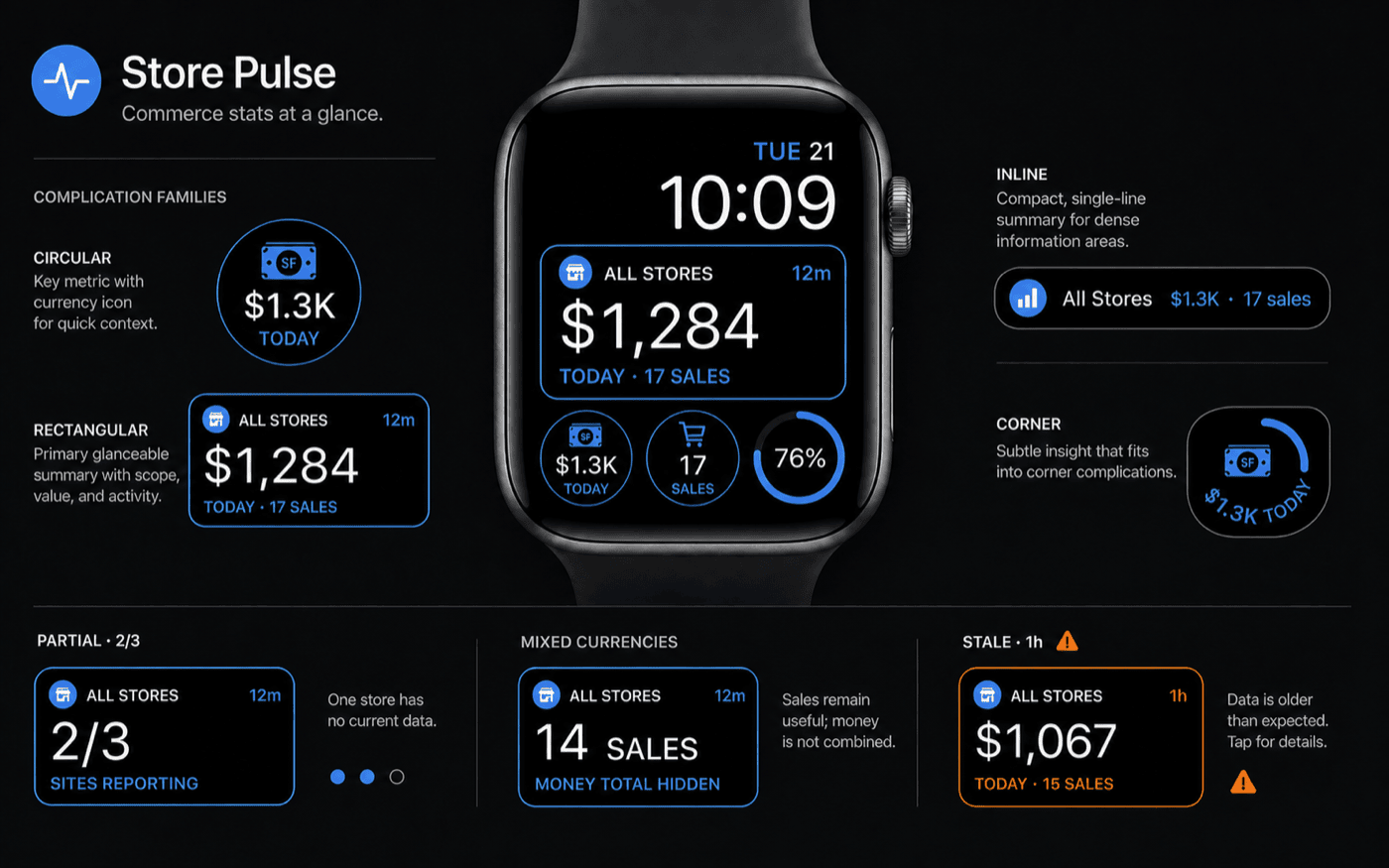
Full Apple Watch support, designed for quick check‑ins.
See today's and this month's revenue, recent sales, and customer details on your Apple Watch. Add the numbers you care about to your Watch face.
DownloadSignalEDD reports at a glance
Today's and this month's totals
See revenue and number of sales for one store or all your stores. DownloadSignal shows when the numbers were last updated and warns you if any data is missing.
Recent sales and customers
See your latest sales, switch stores, and check how many times a customer has bought from you without opening the iPhone app.
Works without your iPhone nearby
After you set it up from your iPhone, the Watch can update over Wi‑Fi or cellular when your phone is not nearby.
Add EDD totals to your Watch face
Choose revenue or number of sales, today or this month, and one store or all your stores. Then choose where it appears on your Watch face.
EDD reports on your Home Screen and Lock Screen.
See current revenue and sales without opening DownloadSignal. Add widgets to your Home Screen, or start a Live Activity for updates on your Lock Screen and Dynamic Island.
See EDD revenue and sales on your Home Screen
Add a widget for revenue, sales, or trends. Choose one store or combine all your stores, see when the numbers were last updated, and get new figures without opening the app.
9:415G ●
All StoresUpdated 8m ago
$1,842
27 sales today
31Calendar●Messages♪Podcasts☀Weather
●✉◉
See EDD sales on your Lock Screen
Start a Live Activity to keep today's revenue, number of sales, and latest completed sale visible on your Lock Screen and Dynamic Island.
Tuesday, July 289:41
All Stores1 min ago
$1,84227 sales today
↗
$149.00 — Taylor Reed
Connect your EDD store.
For the most complete reports and sale notifications, install and activate the DownloadSignal Connector for EDD plugin on your WordPress site. Then open DownloadSignal and choose Connect with WordPress.
Install the connector plugin (recommended)
Install and activate DownloadSignal Connector for EDD in WordPress. It gives DownloadSignal the most complete store data and enables sale notifications. We'll include the connector download link with your beta invite.
Approve DownloadSignal in WordPress
Choose Connect with WordPress in the app, sign in to your store, and approve access. WordPress handles the secure connection, so there is nothing to copy into the app.
If you cannot install plugins
You can still connect with an EDD Public Key and Token. Ask the person who manages your store for them. You will get fewer report details and no sale notifications.
How your store data stays private.
Your reports go directly from your WordPress store to your Apple devices. DownloadSignal does not require a separate account, and sale notifications do not include customer or payment details.
✓Reports go straight from your store to your devices
✓Apple securely stores the connection on each device
✓Widgets and Apple Watch can view reports but cannot change your store
✓Sale notifications include only the order total, currency, and time
✓Remove a lost or replaced device from the DownloadSignal Connector in WordPress
Your store connects directly to your Apple devices
Your Apple devicesDownloadSignal app
Encrypted
WP
Your EDD storeWordPress + EDD
↗
Sale notificationsOrder total, currency, and time only. No customer or payment details.
Common questions
What stores does DownloadSignal support?+
DownloadSignal is made specifically for Easy Digital Downloads stores on WordPress. WooCommerce and other ecommerce platforms are not currently supported.
Do I have to install the DownloadSignal Connector?+
No, but we recommend it. The Connector gives you the most complete reports and sale notifications. If you cannot install plugins, DownloadSignal can also use your store’s existing EDD Public Key and Token. Ask the person who manages your store for them. That option shows less data and does not support sale notifications.
Will notifications work when the app is closed?+
Yes—if the DownloadSignal Connector is installed on your store. Completed-sale notifications can reach your iPhone even when DownloadSignal is closed.
Can I issue refunds from my iPhone?+
Not in the current beta. DownloadSignal shows full and partial refunds and can alert you when an order is refunded, but refunds still need to be issued from your WordPress dashboard.
Do widgets update if I don’t open DownloadSignal?+
Yes. Home Screen and Lock Screen widgets can check your store without you opening the app. Apple decides when widgets update, so the latest numbers may not appear immediately.
Can I use Apple Watch when my iPhone isn’t nearby?+
Yes. Set up Apple Watch once from your iPhone. After that, the Watch can update over Wi‑Fi or cellular when your iPhone is not nearby.
Does DownloadSignal collect my store data?+
DownloadSignal does not collect your full store reports. Reports go directly from your WordPress store to your Apple devices. Sale notifications contain only the details needed for the alert—never customer or payment information.
Are these real app screens?+
Yes. They show the current DownloadSignal app using sample store data. Some details may change before the App Store release.
Join the TestFlight beta.
Join the private beta to try EDD reports, sale alerts, widgets, and Apple Watch features. We'll email the TestFlight link and simple setup steps.
 Join the TestFlight beta